
Description
Organize Every Project, Schedule and Budget in One Powerful Excel Tracker
Stop managing projects through scattered spreadsheets, handwritten notes, text messages and disconnected calendars.
The Boundless Project Management Tracker is a comprehensive Excel project management spreadsheet template designed to help contractors, small businesses, project managers and operations teams organize multiple projects from one easy-to-use workbook.
Manage up to 15 projects, with up to 25 tasks per project, while tracking task owners, working-day schedules, dependencies, progress, subcontractor availability, projected expenses, actual costs and important deadlines.
You get the structure and visibility of project management software without another monthly subscription.
Purchase it once. Use it again and again.
More Than a Basic Project Tracker
This is not simply a project task list.
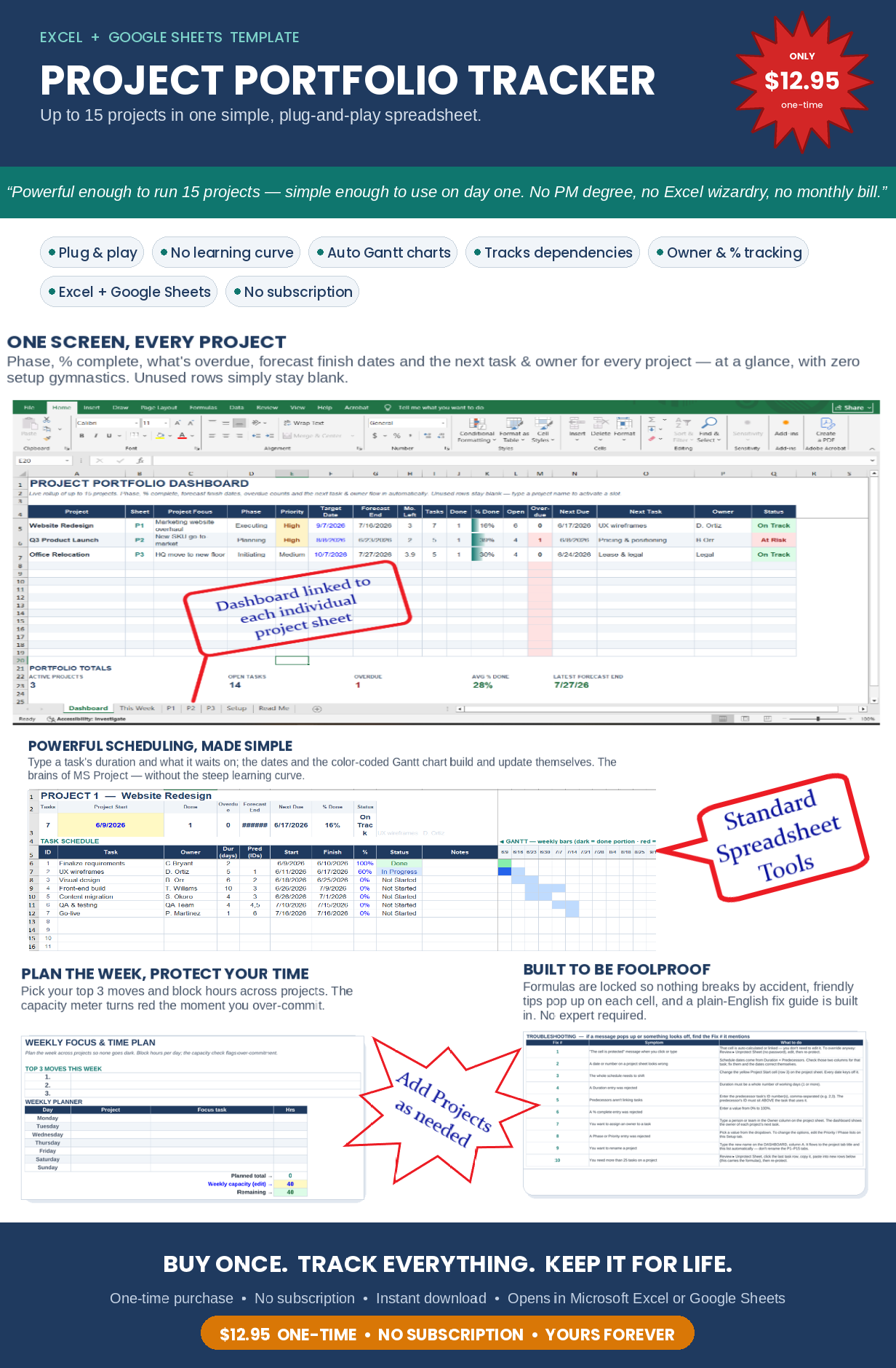
The workbook connects your individual project schedules to a live portfolio dashboard, master schedule, scheduling queue, weekly dispatch view, monthly calendar and project budget tracker.
When project information is updated, the connected reporting and scheduling sections update with it. There is no need to repeatedly copy and paste information between separate spreadsheets just to understand where every project stands.
What Is Included
Multiple Project Portfolio Dashboard
See the status of up to 15 projects from one centralized project management dashboard.
The dashboard displays:
- Project name and project focus
- Project phase and priority
- Target date and forecast completion date
- Total tasks and completed tasks
- Overall percentage complete
- Open and overdue tasks
- Next task and assigned owner
- Current project status
- Projected expenses
- Actual expenses
- Remaining budget
- Budget variance and over-budget status
The dashboard gives you a clear, at-a-glance view of your entire project portfolio without opening every individual project tab.
15 Individual Project Trackers
Each project has its own detailed project management worksheet with space for up to 25 tasks.
For every task, you can enter:
- Task name
- Assigned employee, team member or subcontractor
- Task duration in working days
- Predecessor tasks and dependencies
- Planned start and finish dates
- Percentage complete
- Task status
- Project notes
- Projected task expense
- Actual task expense
Each project page also includes summary information for project progress, overdue work, forecast completion dates and budget performance.
Automatic Task Dependencies and Scheduling
Build a logical project schedule by connecting tasks through predecessor IDs.
The tracker uses finish-to-start task dependencies. When the duration or timing of an earlier task changes, dependent tasks automatically reschedule based on the updated information.
Move the project start date and the connected schedule shifts with it.
This makes the workbook especially useful for construction project management, remodeling projects, installations, service work, product launches, office moves and other projects where one task must be completed before another can begin.
Built-In Excel Gantt Charts
Each project includes a visual Gantt-style project timeline.
The timeline displays scheduled work by week, completed portions of tasks and overdue activity. As project dates and completion percentages change, the timeline updates to reflect the revised schedule.
This gives you a visual project schedule without having to purchase separate Gantt chart software.
Master Project Schedule
The Master Schedule combines active tasks from across all projects into one operational scheduling spreadsheet.
Use it to review:
- Project and task information
- Anticipated start and finish dates
- Assigned task owners
- Contact deadlines
- Trade or subcontractor assignments
- Scheduling status
- Confirmed start and finish dates
- Alternate or replacement providers
- Project locations
- Scheduling notes
- Task status and percentage complete
Project details flow into the Master Schedule, while clearly marked scheduling fields allow you to confirm subcontractors, employees, vendors and work dates.
Contractor and Subcontractor Scheduling Queue
The Scheduling Queue helps you identify which calls and follow-ups need attention.
Tasks are organized by scheduling status, including:
- Ready to Contact
- Awaiting Reply
- Alternate Needed
- Reschedule Needed
- Confirmed Upcoming
- Completed
- On Hold
This contractor scheduling tool makes it easier to coordinate trades, crews, vendors and subcontractors before scheduling problems delay the project.
Weekly Scheduling and Dispatch View
Choose the Monday for the week you want to review, and the This Week page displays tasks whose anticipated or confirmed dates overlap that week.
See upcoming work, assigned owners, scheduling status, job locations, contact deadlines and notes in one weekly project schedule.
This view is ideal for weekly production meetings, dispatch planning, subcontractor coordination and team scheduling.
Monthly Project Calendar
The monthly scheduling calendar provides a compact view of scheduled and confirmed work by day.
Select a specific date to see the complete daily schedule, including projects, tasks, trades, owners, locations, scheduling notes and task status.
Use it to quickly answer questions such as:
- What work is scheduled today?
- Which subcontractors are expected this week?
- Which projects have overlapping tasks?
- What needs to be confirmed before work begins?
Project Budget and Expense Tracking
Track project costs at the individual task level.
Enter the projected expense for each task and record actual expenses as costs are incurred. Project totals calculate automatically and roll up to the main dashboard.
The project budget tracker displays:
- Projected project expenses
- Actual project expenses
- Remaining budget
- Cost variance
- Over-budget warnings
Actual expenses that exceed projected expenses are clearly flagged, helping you identify cost overruns before they become larger problems.
Designed for Real-World Project Management
This Excel project management template is ideal for:
- General contractors
- Remodeling companies
- Construction project managers
- Subcontractor scheduling
- Home-service businesses
- Property maintenance companies
- Installation teams
- Trades and service contractors
- Small business owners
- Operations managers
- Consultants and agencies
- Product launch teams
- Office relocation projects
- Event and production planning
- Anyone managing multiple projects, schedules and budgets
Whether you are managing client projects, construction schedules, employees, subcontractors or internal business initiatives, this workbook gives you one organized place to manage the details.
Easy to Set Up and Use
Start by entering your project names on the Dashboard. Each project name automatically connects to its corresponding project worksheet.
Then:
- Enter the project start date.
- Add your tasks and task owners.
- Enter task durations and predecessor IDs.
- Update completion percentages as work progresses.
- Add projected and actual expenses.
- Confirm trades, subcontractors and work dates through the Master Schedule.
- Review your Dashboard, Scheduling Queue, weekly schedule and Calendar.
The workbook includes a detailed Read Me page, setup instructions, editable reference lists and troubleshooting guidance.
Protected Formulas
Important formulas and cross-sheet connections are protected to help prevent accidental changes or deleted calculations.
The intended input cells remain available for normal editing. An administrator password is included with the workbook for purchasers who need to unlock and customize the underlying structure.
Product Details
- Downloadable Microsoft Excel workbook
- Tracks up to 15 projects
- Includes up to 25 built-in task rows per project
- Multiple-project portfolio dashboard
- Automatic working-day scheduling
- Finish-to-start task dependencies
- Individual Gantt-style project timelines
- Master project schedule
- Contractor and subcontractor scheduling queue
- Weekly scheduling and dispatch view
- Monthly scheduling calendar
- Task-level project budget tracking
- Projected versus actual expense reporting
- Protected formulas and connected reporting
- Instructions and troubleshooting guide included
- One-time purchase
- No monthly subscription
- No physical product will be shipped
For the best functionality and formatting, this project management spreadsheet is designed for use with Microsoft Excel.
Take Control of Your Projects
Replace disconnected task lists, scheduling notes and budget spreadsheets with one connected project management system.
The Boundless Project Management Tracker helps you see what is happening, what is falling behind, who is responsible, what needs to be scheduled and whether your projects are staying within budget.
Manage the work. Coordinate the people. Track the money. Keep every project moving forward.
Buy it once and you own it!!!
No monthly subscriptions. Password protected (buyer gets the password) so nobody can break the formulas. VERY user friendly.



Reviews
There are no reviews yet.